

Dental Network Documentation: 2026 Diagram & Cabling Guide
Document dental networks with diagrams, cabling labels, switches, firewalls, Wi-Fi, circuits, vendors, IP plans, third-party access, and recovery copies.
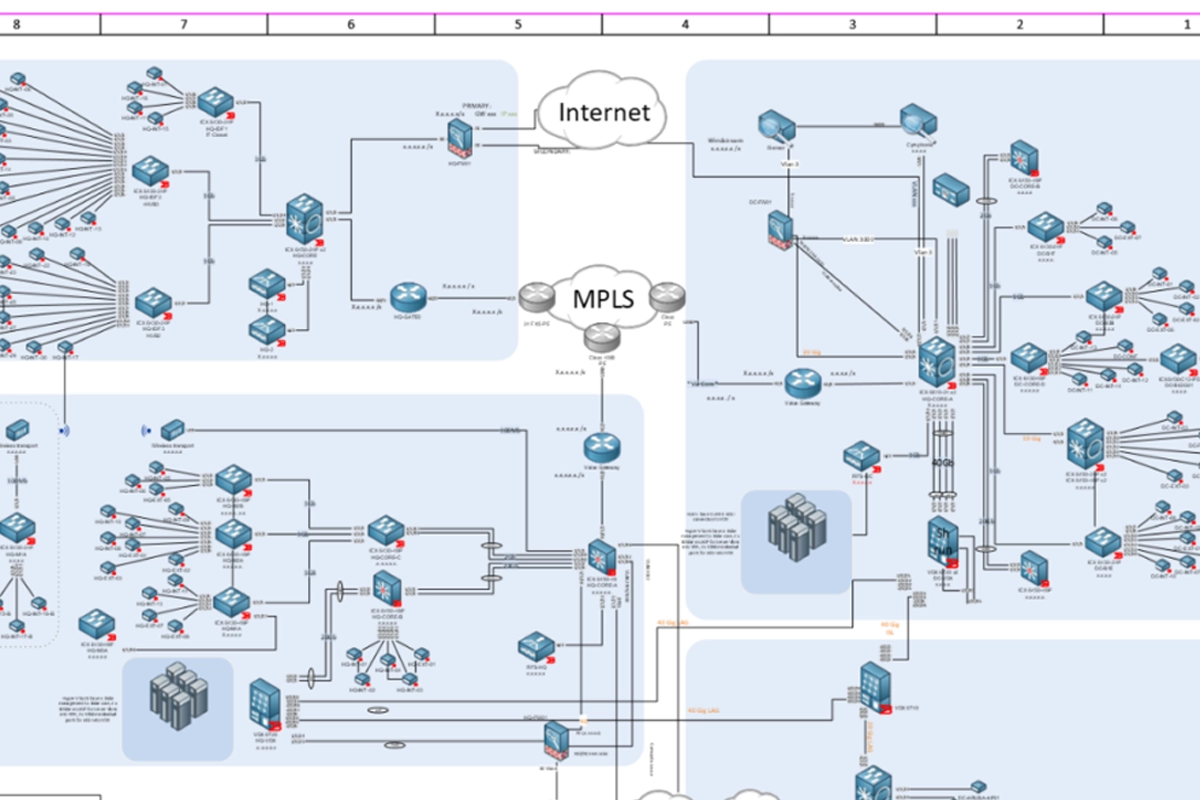
Dental networks evolve through years of remodels, imaging upgrades, new operatories, scanners, phones, cameras, Wi-Fi, server changes, and vendor visits. Without current documentation, troubleshooting starts with discovery every time. CISA's #StopRansomware guidance recommends developing and regularly updating comprehensive network diagrams that describe systems, data flows, topology, interdependencies, third-party access, MSP connections, and cloud connections, and it recommends securely storing documentation with offline or hard-copy backups. Dental practices can apply that principle in a practical, support-focused way.
Key Takeaways
A network diagram should show major networks, topology, addressing approach, interdependencies, cloud/external connections, and third-party or MSP access—not just icons for switches.
Physical labels should connect the diagram to reality: closets, racks, switches, patch panels, access points, firewall ports, circuits, UPS equipment, servers, and critical clinical devices.
Keep documentation protected and recoverable. CISA recommends secure storage plus offline backups or hard copies so responders can use diagrams even when normal systems are unavailable.
Why does a dental practice need a network diagram?
A diagram shortens the time between 'something is down' and understanding what depends on it. If one switch feeds four operatories, an imaging device, and a wireless access point, the technician should know that before rebooting, replacing, or moving cables. The diagram also helps during expansion, vendor onboarding, security review, and disaster recovery.
Documentation is especially valuable when the original installer is unavailable. A supportable practice should not require one person's memory to explain which circuit is primary, where the firewall connects, which VLAN carries imaging, or how a remote vendor reaches a server.
What should the logical diagram show?
Include the firewall, internet handoffs, major switches, wireless networks, servers, backup systems, important cloud connections, VPN or remote-access paths, key network segments, and the relationships between clinical and business systems. Show enough addressing or naming information to orient an authorized technician without turning the document into an exposed credential sheet.
CISA recommends showing major networks, general topology, interdependencies, and third-party, MSP, cloud, and external connections. For a dental office, also note dependencies such as imaging acquisition, PMS database access, VoIP, printers, cameras, and any vendor appliance that requires a specific network path.
What physical cabling information should be labeled?
Use consistent labels at both ends of permanent cabling where practical. Map wall jacks to patch-panel ports, patch-panel ports to switch ports, and important switch ports to devices or rooms. Identify the rack, network closet, firewall, switches, UPS units, access points, server connections, and carrier handoffs clearly.
Do not create a labeling scheme that only the installer understands. A simple documented convention is better than elaborate shorthand. The objective is for an authorized technician to trace a connection safely without unplugging random cables during a patient day.
How should internet and failover circuits be documented?
Record carrier names, service identifiers, handoff location, modem or ONT ownership, firewall interface, static IP information where appropriate, support contacts, and whether a secondary circuit or cellular failover exists. Avoid placing passwords or private keys directly in the diagram.
If failover is part of continuity planning, document which traffic is expected to work during failover and test it. A secondary connection that has never carried the PMS, VoIP, imaging cloud traffic, or remote access may not provide the continuity the practice assumes.
Where should vendor and remote-access dependencies appear?
Document approved remote paths for IT support, imaging vendors, software vendors, equipment manufacturers, or other authorized third parties. Note the business owner of the relationship and the systems the vendor is expected to reach. That makes access reviews and incident containment faster.
Do not put active passwords in a widely shared network diagram. Store secrets in an approved credential system with controlled access, while the diagram identifies that a protected credential or vendor relationship exists and who owns it.
How should network documentation be protected?
Network diagrams can reveal valuable security information, so access should be limited to people who need it. Maintain version history, identify the last review date, and store a recovery copy that remains available if the normal documentation platform is inaccessible during an incident.
CISA specifically recommends securely storing network documentation and keeping offline backups or hard copies on site. The practice should balance availability with confidentiality so an outage does not erase the map responders need, while public or unnecessary access is avoided.
When should diagrams and labels be updated?
Update after switch or firewall replacement, ISP changes, new operatories, imaging upgrades, VLAN changes, new remote-access tools, server migrations, acquisitions, remodels, and other material network changes. Add documentation updates to the project closeout checklist rather than hoping someone remembers later.
A periodic field check is useful too. Compare the diagram with the actual rack and a sample of rooms. Documentation that looked correct after installation can drift as temporary fixes, vendor devices, and emergency cable moves accumulate.
Sources and References
Primary sources used for this article
Regulations, product support information, and incident details can change. Review the linked primary sources for the latest status.
Primary guidance recommending comprehensive network diagrams, third-party connection documentation, segmentation, and protected/offline diagram copies.
Risk-management framework supporting asset, dependency, protection, detection, response, and recovery planning.
Common Questions
Frequently asked questions
Does a small dental office really need a network diagram?
Yes. Even a small office can depend on a firewall, ISP handoff, switches, Wi-Fi, PMS/server access, imaging, phones, printers, cameras, and vendor connections. A concise current diagram can materially reduce troubleshooting and recovery time.
Should passwords be written on the network diagram?
No. The diagram can identify systems and credential ownership, but active passwords, private keys, recovery codes, and other secrets should be stored in an approved protected credential system with controlled access.
What is the difference between a logical and physical network diagram?
A logical diagram emphasizes network relationships, segments, traffic paths, and dependencies. A physical diagram shows equipment, rooms, racks, cables, ports, and other location-specific connections. Dental practices often benefit from both views.
Should dental vendors be shown on the diagram?
Show approved third-party connections and the systems they are expected to reach. This helps access review, troubleshooting, and incident response while keeping actual credentials in a separate secure system.
How often should network documentation be reviewed?
There is no universal interval for every office. Update after material changes and use a periodic review appropriate to the practice's rate of change so temporary fixes and vendor installations do not silently make the diagram obsolete.
Why keep an offline copy of network documentation?
During ransomware, cloud outages, account lockouts, or major network failures, the normal documentation platform may be unavailable. A protected recovery copy can help authorized responders understand the environment when they need it most.